Showing posts with label gateway. Show all posts

Saturday, February 7, 2026

Gateway Version 1.5.6

Stability, SMS Integration, and UI Refinement

I'd like to announce the release of v1.5.6 for the OHS_2-gateway. This update brings critical under-the-hood refactoring for better performance while introducing several requested features for daily usability.

🚀 Key New Features

  • HTTP Server Advanced Alerting System:  The Web UI alerts are overhauled. You’ll now see distinct visual feedback for Info, Warning, and Error levels, making it much easier to confirm when settings have been saved correctly.

  • "Zones Needed to ARM" Logic: This is a major security enhancement. You can now flag specific zones as "required." If you attempt to arm a group while one of these zones is compromised, the request will be rejected. There are plans for follow-up updates for authentication nodes to provide audible feedback when an arming request is rejected for this reason.

  • MQTT SMS Integration: We’ve expanded our MQTT capabilities. You can now trigger SMS messages via two new subscribe topics:

    /SMS/contact/{index}/message – Target a specific user.
    /SMS/group/{index}/message – Broadcast to an entire alarm group.

  • Config Portability: You can now download and upload simple configuration files directly through the web interface.

🎨 UI & UX Improvements

  • Cleaner Layout: We’ve removed the bottom slider for a more streamlined page layout.

  • Cross-Platform Consistency: CSS and button styles have been updated to ensure text visibility and button alignment are consistent, specifically targeting fixes for users on macOS.

  • SMS Status Checks: You can now query system status via SMS commands for better remote management.

🛠️ Under the Hood: Performance & Refactoring

A massive amount of work went into the codebase for this release to ensure the gateway remains fast and maintainable:

  • HTTP Server Overhaul: The web server code was refactored, and handlers were moved into dedicated files.

  • Memory Efficiency: Optimization of getPostData handling are faster and lighter on memory.

  • uBS Library Redesign: Introduced common static buffers and enhanced the Free and Master maps for better resource management


Download & Update

The full release is now live on GitHub.

👉 Download Version 1.5.6 here

Thanks to the community for the ongoing feedback and testing!

Monday, December 22, 2025

ChibiOS 20.3.x to 21.11.x Migration Success for Gateway

The migration from ChibiOS 20.3.x to the latest stable 21.11.x branch has been completed internally for the gateway. This upgrade adopts RT kernel version 7, with custom backports for Ethernet and RS485 functionality, plus adaptations to the new UART API for modem operations. A successful build is now available for testing.

​Key Migration Steps

  • Updated core OHS components to kernel 7 compatibility, addressing API changes in HAL 8.0.0 including SPIv2 drivers and improved STM32 support.
  • Backported custom Ethernet and RS485 drivers, leveraging UART driver callbacks for transmission end events essential in half-duplex RS485 setups.
  • Modified modem UART integration to align with the new driver model, ensuring reliable communication in IoT gateway scenarios.

Resources and Downloads

Potential Hiccups and Tips

Fell free to test the new binary and report any bugs through the discord @ #gw-latest

Sunday, December 8, 2024

GW Firmware Updates

Recently, there have been a few noteworthy updates to the GW firmware, primarily from the new GW owners. As always, the latest version 1.5.4 is available on the GitHub  releases page.

Here are some key changes:

  • Automatic republishing of zone states to MQTT after reconnecting to the MQTT server. This is useful when updating Home Assistant (HA).
  • The lwIP network library has been updated to stable version 2.2.0.
  • mDNS has been added, both as a client and resolver. The GW is now accessible at http://ohs.local, eliminating the need to search for its DHCP-assigned address.
  • A test alert feature has been added to the web interface, making it easier to verify that all alert paths are properly configured directly from the browser.
  • A new alert path has been introduced. Now, all alerts can be propagated to the MQTT topic /OHS/alert and subsequently consumed in HA.
  • The shell, accessible via USB, now allows for resetting the web admin user to its default settings.


Friday, September 13, 2024

MQTT Homeassistant Auto Discovery

A new version of the gateway firmware (v1.5.0) is now available, offering enhanced MQTT support with the addition of Home Assistant Auto Discovery. As always, the updated firmware image is available on GitHub.

Now, let's take a closer look at what MQTT and Home Assistant Auto Discovery are.

MQTT (Message Queuing Telemetry Transport) is a lightweight messaging protocol ideal for devices that need to communicate in real-time, such as sensors and smart home devices. By implementing MQTT in your burglar alarm system, you enable real-time data transfer between the system and Home Assistant. 

Home Assistant Auto Discovery is a feature that allows Home Assistant to automatically detect and configure devices that support MQTT. This eliminates the need for manual configuration, as Home Assistant will automatically generate entities such as sensors, switches, and binary sensors based on the MQTT messages from your alarm system.

If you're new to MQTT, Home Assistant offers a convenient solution with the Mosquitto Broker add-on. You can easily install it directly from Home Assistant by navigating to Settings > Add-on Store and searching for "Mosquitto Broker." Once installed, head over to the Mosquitto Broker page in the Add-ons section, and click Start to launch the broker. For added security, it's recommended to create a dedicated user (e.g., "mosquitto") with its own password, under which the broker will operate.

Now let's go back to new gateway features. As always they are configurable over the web
interface. Main option to enable Home Assistant Auto Discovery is right on the Setting page as a toggle switch as shown on the picture. Enabling this will create the main MQTT topic for system state, allowing the Home Assistant to see it along with hardware and software version information and link to gateway web configuration page.

Additionally, similar switches are added to all groups and zones. When these switches are enabled, they are automatically propagated to Home Assistant as corresponding entities. This allows you to manage and control these groups and zones seamlessly within Home Assistant, enhancing integration and automation possibilities.

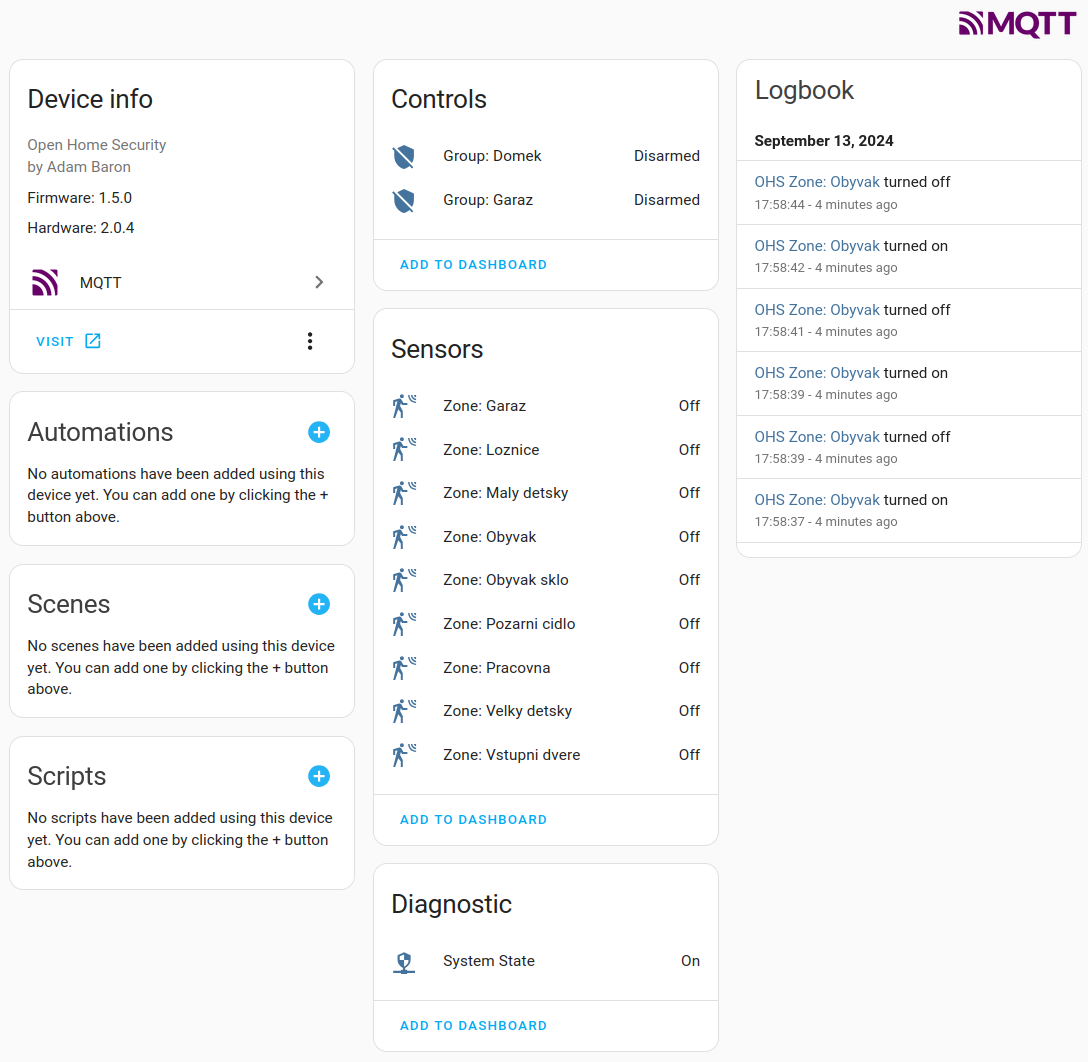
Following picture shows my gateway as new device inside Devices & services for MQTT.

This then can be then added to dashboard, and interacted with as any other Home Assistant device. 

Hope you like it :)

Saturday, January 15, 2022

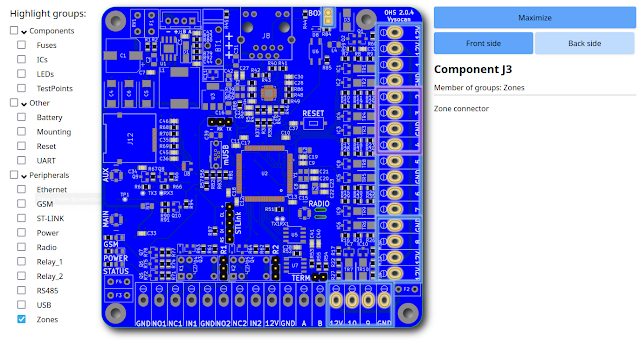
Gateway 2.0.4 pinout

Just short update, using nice tool called pinion with few hiccups,  I've created quite nice diagram for pin-out of OHS gateway 2.0.4.

https://vysocan.github.io/OHS_20x.html

It offers nice visuals with highlighting of pins and grouping by type. It has to be hosted out of blogger, as blogger does not allow embedding your own CSS, JS and pages easily.

Saturday, November 13, 2021

Authentication added.

New firmware version 1.3.9 has been just released. It includes few minor improvements, and as main new feature an authentication, that was added to web interface.  How it works is pictured on right side. Every new client connection is asked for user and password that must match with internal values. Default user is: admin, and default password is: pass. Both then can be changed in Settings.

At first I was thinking to use obsolete HTTP basic authentication, to make it simple. But it is very obsolete, and also not supported by vanilla HTTPD from lwip contrib package. I was thinking how to add an authentication for a longer time. There are several methods to be used. First would be creating a single page application with authentication message encrypted in URL as parameters. Witch would require a bigger re-work on the HTML page generation. Now HTTPD has several pages, on which user can set tens of options for each section on a page. Quite a difficult task.  Second, to use a cookie to store some secret after user authenticate successfully on browser side, and request the browser to send this secret with each request. But lwip's HTTPD does not support cookies. 

Well I deiced for second option. I created a simple patch to HTTPD  to handle cookie generation and reception. First is done as part of dynamic header option for pages that are not statically liked, that is not generated via makefsdata program. Then, I added an additional callback, that is preceding request for every fs_open (file system open function). This allows an application to verify received cookie and then, if needed, rewrite the page( or file) requested to something else, for example login page.

I think it is nice and neat addition to lwip's HTTPD, so I will try to push it upstream, hoping it will get accepted.

New pre-compiled version is as always available GitHub, together with all sources. Enjoy!

P.S. Finally this is new version for my "production" home gateway. Resetting it after 163 days. Quite satisfied 💪

Wednesday, February 3, 2021

2.0.4 gateway footprint

In case someone would like to drill holes to hold the gateway up in metal casing, or have better understanding of connectors and components on 2.0.4 PCB I've put a PDF file in Google drive for print.


Tuesday, February 2, 2021

A7600E modem tests

The new SimCom A7600E modem is pin to pin compatible and working well in the gateway, so far no software changes needed.  Supporting both 2G and 4G/LTE. One benefit is that it comes up and also shuts down faster then 7600E or G.

2G:

4G/LTE:

Sunday, January 17, 2021

MQTT subscribe

A new 1.3.1 version of gateway firmware is committed to GitHub which is enabling MQTT subscribe functionality.

Gateway subscribes on topics: /OHS/set/#, particularly parses following 

/group /{#} - index of group {1 .. ALARM_GROUPS}
  /state - allowed commands {disarm, arm_home, arm_away}
/sensor - allowed only for Input nodes
 /{address} - node address like W:2:I:D:1
  /value - float value send to remote node
 

To describe it better for someone new to MQTT.  MQTT is an open OASIS and ISO standard,  lightweight, publish-subscribe network protocol that transports messages between devices. The protocol usually runs over TCP/IP. It is designed for connections with remote locations where a "small code footprint" is required or the network bandwidth is limited.

For example:

/OHS/set/group/#/state topics is able to perform disarm, arm_home, arm_away commands for group index specified as #.

/OHS/set/sensor/{address}/value topics is able to receive float number that is then passed to appropriate node address.

Above subscribe and already existing publish functionality allow direct integration with mobile applications,  logging platforms for sensor data, or Home Assistant:

Saturday, January 16, 2021

New board revison, bulk buy, discount on 2.0.4 gateway

Last week I've received new 2.0.4 gateway boards. There are a few visible changes like connector description on silk screen and cut out hole for zip tie to hold on the RFM69 pigtail cable. And a few not so visible changes in routing and such, but none of them are really a reason to call it a new revision.

One problem that I've started to realize is relatively pricier GSM modem. The 2G/3G/4G SIM7600x are starting at 40EUR for regional and 50EUR for Global band coverage. I was looking for some cheaper alternative while still keeping at least 4G, and the apparent replacement seemed to be a new SimCom A7670x. Unfortunately these use different package, and are only covering Europe and China, still I deiced to give it a go and spun a new version of gateway. Just few days before sending it to fab I received a newsletter from SimCom that they released same modem module called A7600E which is pin compatible to one that gateway already use (7600X). One difference it is still Europe only and only 2G/4G. I think it is reasonable as 3G is, at least in Europe, being replaced by 4G/5G networks. Good thing is it requires only one antenna and it is 5EUR cheaper. I've ordered 2 units to test them.

For gateway, I have consolidated all the components, and I was able to get the price down by making bulk buy for all pricier components. Like buying the STM32F437 at RS Components, were it is 50% of my local distributor price.. This should reduce the final price to some 92EUR without a modem.

Monday, December 21, 2020

Adding MQTT to gateway 2.x

MQTT was somehow last step of adding features present in gateways 1.x to gateway 2.x. Now with last version of 1.3 release, already available in GitHub releases, this come to live. For now only publish functions are implemented, but subscribe procedures and skeleton is already prepared. Beware that 1.3 release forces whole configuration to be erased! I suggest to take screenshots of each page before upgrading. I know it is not very convenient, and I will try to implement mechanisms that such future changes will be a bit elegant. That is without the need to reconfigure whole gateway again.

MQTT publish functions are now having their own thread, that is collecting queue of publish request. The thread then pushes one publish a time when system allows it.

The publish structure is a bit different, as it now more relies on given indexes and addresses rather then on names of elements. Main topis is OHS with subtopics:

 /state {On, Off} - Indicates if system is on
 /group
   /{#} - index of group
     /name
     /state {disarmed, arming, armed_home, armed_away, triggered, disarming}
 /zone
   /{#} - index of zone
     /name
     /state {OK, alarm, tamper}
 /sensor
   /{address} - node address like W:2:K:i:0
     /name
     /value

There are other small changes like Nodes tab is now showing value of authentication nodes, that is a name of person who last armed/disarmed this node. Same name is also passed to MQTT sensor value for same node type.

You can test now new 1.3 version with initial MQTT support, but there can be some rough edges.

Tuesday, September 29, 2020

Travis CI and precompiled firmware for OHS 2.x

Over last weekend I've created a Travis continuous integration for OHS 2.x gateway repository. This CI performs a test build on every commit that is pushed to it. What it does is that it verifies that the commit is buildable, and maybe more importantly, it creates new compiled firmware related to every new commit, and places it back in releases section directly in GitHub.

This means that the latest, and also historical firmware are now available for download in https://github.com/vysocan/OHS_2-gateway/releases 

Binary files .bin can be directly used for DFU - Device Firmware Upgrade.

Tuesday, August 25, 2020

DFU - Device Firmware Upgrade

Gateways 2.s have now a new user convenient way of upgrading firmware without any external programmer. As STM32F4xx devices include built in USB DfuSe bootloader, I was wanting to implement such functionality into OHS as well. Since software version 1.2 there is an option in shell interface to boot the device to dfu mode., and then upgrade the firmware directly via USB cable.

DFU tools:

dfu-util  is a simple multi-platform command line tool that can upload binary data directly to flash.

List DFU ready devices via: dfu-util -l

Example output of gateway 2.x, most important is the 'alt=0, name="@Internal Flash  ' descriptor that we gonna use:

Found DFU: [0483:df11] ver=2200, devnum=12, cfg=1, intf=0, path="3-6", alt=3, name="@Device Feature/0xFFFF0000/01*004 e", serial="336A34763437"
Found DFU: [0483:df11] ver=2200, devnum=12, cfg=1, intf=0, path="3-6", alt=2, name="@OTP Memory /0x1FFF7800/01*512 e,01*016 e", serial="336A34763437"
Found DFU: [0483:df11] ver=2200, devnum=12, cfg=1, intf=0, path="3-6", alt=1, name="@Option Bytes  /0x1FFFC000/01*016 e/0x1FFEC000/01*016 e", serial="336A34763437"
Found DFU: [0483:df11] ver=2200, devnum=12, cfg=1, intf=0, path="3-6", alt=0, name="@Internal Flash  /0x08000000/04*016Kg,01*064Kg,07*128Kg", serial="336A34763437"

Flash the firmware via: dfu-util -a 0 --dfuse-address 0x08000000 -D ch.bin

STM32CubeProgrammer is also multi-platform tool but with graphical user interface. One downside is that you need older Java version installed to run it, but once you have it it will work nicely.

DFU howto:

  1. Connect your laptop/PC via USB cable to gateway. Status LED on gateway should change to short rapid flashes.
  2. Open any terminal emulation program like Putty and open serial connection to new enumerated USB device. On Linux it will be ACM0.
  3. In the terminal issue command 'boot dfu'.
  4. The gateway should close the USB connection, terminal will exit, or close, and the status LED will stop blinking.
  5. New USB device should be enumerated as 'STMicroelectronics STM Device in DFU Mode'
  6. Use any of DFU tool to list, connect and to download(in terms of to download a file to a DfuSe device) firmware into gateway.
  7. Reset the gateway via onboard reset button.


Friday, May 3, 2019

Updates in 1.7.6.4

This update is rather small and concentrates only on users having problems with false alarm of AC disruption on PSC-35A switching power supply.


If your PSC-35A or PSC-60A is repeatedly reporting AC On and Off alarms in OHS Log, then you should definitely go for the update. It adds kind of oversampling of AC_OFF pin, and also introduces 60 seconds delay when On/Off alert is issued.

As it is only minor version update configuration of you GW will remain as is.

Purpose of it, is to overcome the short, but frequent pulses of logical 1 to AC_OFF signal even when it supposed to be 0. This is caused by some logic inside the PSU.

If you still experience any issues with this PSU, let me know, best to use forum.

Firmware is pre-compiled in firmware section. 

Sunday, February 3, 2019

Preparation for new OHS gateway.

There is almost all functionality in OHS gateway that I have wanted when I started, however I have internal need to carry on :). One thing, I would like to improve, is the crypto capabilities that can never be achieved on otherwise very nice ATmega1284P 8 bit MCU. It somehow led me to look further into another step that would be 16 or 32 bit MCU. There are many choices in therms of available MCUs and platforms. Maybe to stay on Arduino platform and choose some of the ARM Cortex available. But I have decided to stay with older brother of now used NilRTOS called ChibiOS/RT, since the "operating system" RTOS is maybe the most important for me.

ChibiOS can support variety of MCU including RaspberryPi and ATmega, but vast majority of supported MCU are STM32 families of many kinds. Looking at those mighty 32-bit ARM MCU, I have picked one called SMT32F407. These are high-performance Cortex-M4 32-bit RISC operating at a frequency of up to 168 MHz. They features a floating point unit (FPU), Ethernet, USB, RTC and so on. They have up to 1MB of flash storage and 128k of user usable RAM, and they are available in in various packages with varying pin count.

My goal is to create new gateway with similar functions as the current ATmega one, and then build up on this.The gateway may have different number of hardware zones, but I want to use wire and wireless nodes and zones. That is, I intend to still use Arduino based nodes s much as possible, just because of their easy to use nature. I plan to add GSM module on gateway, maybe as add-on board, so it can be swapped to 4G module in future. And also wireless radio, maybe as add-on board too. SMT32F407 has software defined TCP/IP stack, and it can be used with IPv6, Web Socket, SSL/TLS and so on. And what I like most, as ChibiOS supports many more even higher performance MCU, the future grow will be then much easier.

Saying all that I will continue to support, and develop new functionality on current ATmega gateway, as I use it at home :). The new one will not come anytime soon (this year), as it bring great deal of challenges in terms of HW and SW. Also I will keep the project open, as I do not like equipment that dies when its producer decides to cut it off, or just disable the required host server.

Monday, January 21, 2019

New PCB

It is always nice when someone appreciate your work, especially if you give the product to public as free to use. It happened to me as well, I was asked to review a PCB fabrication house called pcbway.com. Without too much hesitation I have sent them Gerber files of OHS gateway, and two of weeks later postman brought me the package, nice :).

I must say I have tried around 4 different China fabrication houses, and this one is fifth. I tend to do my board easy to hand solder, and I do not use fine traces or gaps bellow 10mils. This give me better trust to choose rather inexpensive manufacturing processes. There is not too much difference between ordering in pcbway and other houses, you do all as usual on their web pages. One difference though, is they probably inspect the gerbers by person. It came to me as I have used 6mil trace/gap option as the basic available, and within 1 day after submitting gerbers they proposed me to change it to 5mil. First time I've seen that actually someone had a glimpse of my layout before manufacturing. Of course it was a little more expensive, but still within the free coupon I was given for review.

The boards themselves are nicely made. I can compare to 2 other PCB houses I have boards from. I will skip the traces evaluation since I have no visual or other tool to do any reasonable comparison. But first think you notice with bare eye is silk screen, it is noticeably vivid and precise. It's placement is usually the weakest point in China PCB houses. But this board is done accurately, not faint and not smeared. I think using this fab one can afford to put logo on silk screen and not be afraid that it will come out ugly.
Second difference is via placement. When you use IC with many legs you usually route signals to other IC close to each other, this leads to having vias sit to each other in some pattern too. On such patterned vias you can easily spot the sharpness and bit placement. I must say there the vias on the PCB are great I would not be afraid to go with lower then my 0.3 millimeter.  Along with via quality goes actual hole placement. And it is similar to vias, nicely placed in exact center of pad.
Third difference I've noticed is solder mask, using loupe the mask is somehow more corresponding to what is draw in gerbers. Put it simply, exposed copper pads are smaller and more precise. This will help especially during soldering, the small components will not wander around, and IC will not have as many solder bridges.

Here is picture hopefully supporting my point, with pcbway PCB closer on top overlapping seeedstudio PCB. You can see here of-centered holes and wider solder mask along with nice silk text.


As I said on beginning, I do not develop over-complicated PCBs with many layers, buried vias or impedance control, so my evaluation is as erudite as hobbyist can offer. But I would say I will use the pcbway services in future for sure.


Monday, December 31, 2018

Updates in 1.7.6.3

New minor release is ready with following changes:
  • Full support for remote radio Authentication node including rather big change in RFM69 thread.
  • Update of WebUI, added JavaScript to Trigger menu to better show meaning of Pass option.
  • Update of WebUI, on Triggers and Timers overview. Many of the columns that are blocked via option, that is, they are now shown as blank instead of default for clarity.
  • Updated DigitalIO library most recent one and relevant OHS code.
  • Updated Ethernet library to most recent version (Now even newer Ethernet library available, need to do it again). 
  • Updated GSM library, there are some enhancements in parser.
  • Fixes in counting radio packets and other counters (++i vs. i++).
  • Few minor bugs fixed in WebUI. 

Tuesday, April 17, 2018

Arduino IDE upgrade

I have just updated instruction in Compiling section on right. This include complete setup of latest Arduino IDE and its environment to compile your own version of gateway firmware.

The move from 1.6.9 to 1.8.5 resulted to around 3KB smaller flash size, but on the other hand increased around 100B in RAM size. RAM size increase might be just result of different calculation of unused stack above NilRTOS environment.

Tuesday, February 20, 2018

Updates in 1.7.6.1

Here is list of updates in current release:
  • Added authentication (iButton key) handling into radio thread. That is, now both wired and wireless nodes are able to send arm/disarm keys to gateway. Keep in mind, that battery powered node is not a good option as authentication will not wait for you to recharge node battery :)
  • Removed Ethernet driver restart when MQTT server is not reachable, now only MQTT part is restarted. Will see how it goes in long time, if web interface will recover after network failure/power off.
  • Web interface for GSM modem is changed and simplified. Now there is also GSM model info included.
  • Startup sequence for GSM is prolonged and changed to comply with SIM800C start-up times.
  • SMS handling is changed to accommodate both SIM800 and SIM900.
  • Logger and alert thread is verified, and includes some slight changes. Email alert is moved as last, and needs to further work.
  • SMS command gateway bug fixed, it should correctly handle incoming SMS messages.
  • Updated Ethernet library to latest release.
  • Added special global trigger for all Battery type nodes. It is activated when voltages is bellow 3.6V and deactivated when above 4.16V. Alert handling setting is common with other triggers. That is, it follows your setting on global tab.
  • JavaScript was added in web interface of timers. Calendar and Period switch toggles On and Off part of controls that are meaningless.
  • Template function was added to all HTML input elements, reducing the code size ~ 1.5kB. But was taken by new code again :)
Gateway source and libraries are pushed to GitHub.

Saturday, October 21, 2017

New major version 1.7.6.0

Since summer time I was adding some features to gateway that led into new major version 1.7.6.0. Changes include:
  • Remote zones added.
  • Added group arm and disarm chain. That is when arming/disarming group by key, Gateway is able to automatically arm/disarm another group or groups.
  • Added group state MQTT publish. Gateway now, if enabled, will publish state of group via MQTT. Such information can captured by Home Assistant or other automation program.
  • MQTT sensor publish structure modified, added group name to path.
  • Updated MQTT library and MQTT protocol to 3.1.1.
  • Added new sensor type "Battery", to easily identify battery powered nodes voltage. 
  • Added new sensor type "Gas", to easily identify any air quality environmental sensor.
  • Added SMS command gateway. Authorized numbers from contact list are able to get Group state or set it On, Off, Arm and Disarm by sending SMS in predefine format to gateway GSM number. This functionality need some testing.
  • Updated NilRTOS to latest version available. In future port is needed to ChNil, which is newer replacement of NilRTOS, but unfortunately not one to one compatible with NilRTOS.
  • Various small enhancements in code and web interface.
New version is now at GItHub.