Recently I have started to play with feature that was on my list for long time. That is remote zone. To introduce it a little, on beginning I had in mind 2 general types of zones. Local zones are directly connected to gateway hardware. These can be build in 8 analog plus 4 digital zones, or zones connected by I2C expansion connector. Then remote zones connected either by RS485(wire) or wireless zones. Connection type does not matter to gateway, but such zones can be divided to two groups by reporting state. One group would report fully its state, that is it will report every change of state out of OK, PIR or Tamper. The other, battery powered remote zones, will only report alarm states such as PIR or Tamper. Gateway will then automatically change the zone state to OK if there is no event received for 2 seconds.
Remote zones brings new possibilities, you can build yourself a wireless PIR and add it to your gateway. Or you can build remote expander, either wired or wireless that will extend you zone count. Imagine you have barn near by, and you have only 4 wires connected to barn, that is only enough wires for authentication node. Now you decide you need two analog plus one digital zones there. Simply enough you connect such zones, with some little protection circuity, directly to authentication node. Add code to authentication node to include zone registration plus zone state handling, and you have 3 new zones connected.

I have here on my desk for test a battery powered remote zone, as shown on
picture. It is running for some days, and seems to do its job properly. I use Chinese all-in-one PIR sensor AS312 attached to PIR shell by hot glue. For this purpose I have modified standard battery node code and added zone state handling, based on interrupt signal coming form PIR sensor. The node does also temperature and humidity monitoring out of external SHT11. Battery life seems to be reasonable, with some modification it could last few months with 700mAh Li-Po. This is tempting, it would be nice to create rechargeable wireless PIR sensor that could be placed into standard commercial PIR shell :). I will publish the code to GitHub as example code.
Registering is same as for sensors. As soon as the node is powered up it will send registration packet and gateway will add a zone in zone tab. Then you can set attributes as for any other zone. Zone setting are sent back to nodes as master copy, and on next power cycle the zone is registered with newly stored attributes. There are enforced rules for remote zones during registration, such as analog digital flag on bit 15 and it is based on registration type ('A' or 'D'). Or remote zone flag on bit 12 is set On, and present bit flag on bit 14 is set On. Zone number cannot override any local zone, that is it cannot be lower then 13, or cannot override existing I2C zone. Zone last OK and PIR timestamps are set to registration time. Sleeping battery powered remote zones share the same message queue as sensors, that is gateway keeps registration packet for at least one hour to not loose such packets during node sleep.
.png) Also here is an example of my own groups (Garage, House) and zones (PIR, reed) setting for ground floor.
You can see here how authentication unit is attached to particular zone. Only
these zone is then set up with authentication delay. That is, when someone
trips these zones there is time allowed for the person to authenticate.
All other zones in house group trigger the alarm state immediately. You can
read more about it in zone's setting.
Also here is an example of my own groups (Garage, House) and zones (PIR, reed) setting for ground floor.
You can see here how authentication unit is attached to particular zone. Only
these zone is then set up with authentication delay. That is, when someone
trips these zones there is time allowed for the person to authenticate.
All other zones in house group trigger the alarm state immediately. You can
read more about it in zone's setting.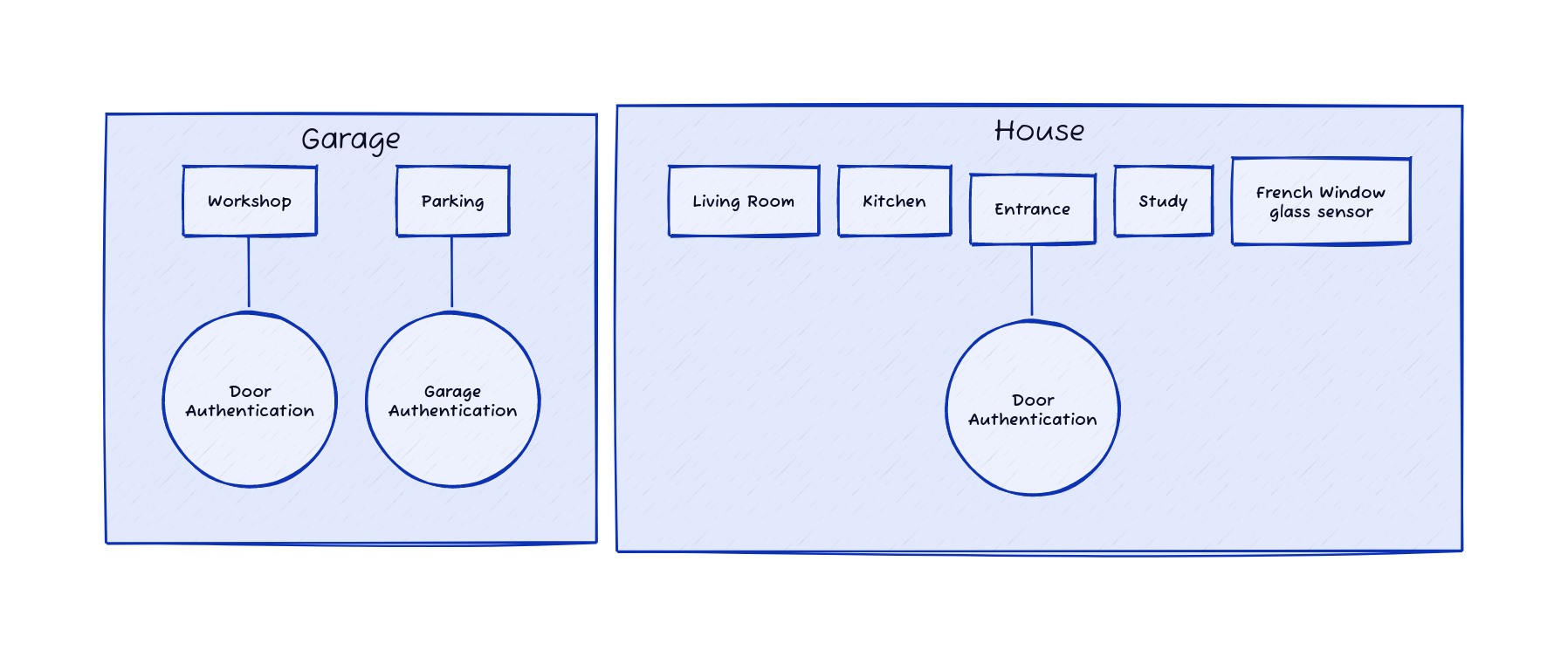.png)


