Showing posts with label firmware. Show all posts

Saturday, February 7, 2026

Gateway Version 1.5.6

Stability, SMS Integration, and UI Refinement

I'd like to announce the release of v1.5.6 for the OHS_2-gateway. This update brings critical under-the-hood refactoring for better performance while introducing several requested features for daily usability.

🚀 Key New Features

  • HTTP Server Advanced Alerting System:  The Web UI alerts are overhauled. You’ll now see distinct visual feedback for Info, Warning, and Error levels, making it much easier to confirm when settings have been saved correctly.

  • "Zones Needed to ARM" Logic: This is a major security enhancement. You can now flag specific zones as "required." If you attempt to arm a group while one of these zones is compromised, the request will be rejected. There are plans for follow-up updates for authentication nodes to provide audible feedback when an arming request is rejected for this reason.

  • MQTT SMS Integration: We’ve expanded our MQTT capabilities. You can now trigger SMS messages via two new subscribe topics:

    /SMS/contact/{index}/message – Target a specific user.
    /SMS/group/{index}/message – Broadcast to an entire alarm group.

  • Config Portability: You can now download and upload simple configuration files directly through the web interface.

🎨 UI & UX Improvements

  • Cleaner Layout: We’ve removed the bottom slider for a more streamlined page layout.

  • Cross-Platform Consistency: CSS and button styles have been updated to ensure text visibility and button alignment are consistent, specifically targeting fixes for users on macOS.

  • SMS Status Checks: You can now query system status via SMS commands for better remote management.

🛠️ Under the Hood: Performance & Refactoring

A massive amount of work went into the codebase for this release to ensure the gateway remains fast and maintainable:

  • HTTP Server Overhaul: The web server code was refactored, and handlers were moved into dedicated files.

  • Memory Efficiency: Optimization of getPostData handling are faster and lighter on memory.

  • uBS Library Redesign: Introduced common static buffers and enhanced the Free and Master maps for better resource management


Download & Update

The full release is now live on GitHub.

👉 Download Version 1.5.6 here

Thanks to the community for the ongoing feedback and testing!

Tuesday, January 6, 2026

Gateway Release 1.5.5

Release 1.5.5 brings significant updates centered around ChibiOS migration and new communication features.

ChibiOS 21.11.x Migration

The gateway has been migrated from ChibiOS 20.3.x to the latest stable version 21.11.x, which is now the primary RTOS version for OHS_2. This major update required extensive work including migration to kernel 7, backporting custom Ethernet and RS485 changes, and updating the modem component to the new UART API. A float number display bug in the web interface was identified and fixed shortly after the initial migration.

SMS Command System

A new SMS command feature enables remote control through text messages using a hierarchical command dispatcher library. The system parses incoming SMS messages and routes them to specific handler functions that can execute actions and respond back to the requester. Security is enforced through phone number verification against stored contacts. The implementation includes a built-in help system that leverages the static command structure for user guidance.

MQTT Improvements

MQTT processing received several enhancements focused on reliability and functionality. A dedicated worker thread now handles incoming subscribe events, moving processing out of the data callback to follow lwIP best practices for ISR-like callback handling. A new /OHS/set/zone/refresh and /OHS/set/group/refresh subscribe topic was added, allowing all enabled zone or group states to be republished to MQTT on demand without requiring a payload.

Home Assistant Integration

Home Assistant auto-discovery support was added for sensors, enabling automatic configuration of OHS sensors that are directly supported by both platforms.

The release is available for download with the OHS_F437.bin firmware binary.

Monday, December 22, 2025

ChibiOS 20.3.x to 21.11.x Migration Success for Gateway

The migration from ChibiOS 20.3.x to the latest stable 21.11.x branch has been completed internally for the gateway. This upgrade adopts RT kernel version 7, with custom backports for Ethernet and RS485 functionality, plus adaptations to the new UART API for modem operations. A successful build is now available for testing.

Key Migration Steps

  • Updated core OHS components to kernel 7 compatibility, addressing API changes in HAL 8.0.0 including SPIv2 drivers and improved STM32 support.
  • Backported custom Ethernet and RS485 drivers, leveraging UART driver callbacks for transmission end events essential in half-duplex RS485 setups.
  • Modified modem UART integration to align with the new driver model, ensuring reliable communication in IoT gateway scenarios.

Resources and Downloads

Potential Hiccups and Tips

Fell free to test the new binary and report any bugs through the discord @ #gw-latest

Sunday, December 8, 2024

GW Firmware Updates

Recently, there have been a few noteworthy updates to the GW firmware, primarily from the new GW owners. As always, the latest version 1.5.4 is available on the GitHub  releases page.

Here are some key changes:

  • Automatic republishing of zone states to MQTT after reconnecting to the MQTT server. This is useful when updating Home Assistant (HA).
  • The lwIP network library has been updated to stable version 2.2.0.
  • mDNS has been added, both as a client and resolver. The GW is now accessible at http://ohs.local, eliminating the need to search for its DHCP-assigned address.
  • A test alert feature has been added to the web interface, making it easier to verify that all alert paths are properly configured directly from the browser.
  • A new alert path has been introduced. Now, all alerts can be propagated to the MQTT topic /OHS/alert and subsequently consumed in HA.
  • The shell, accessible via USB, now allows for resetting the web admin user to its default settings.


Friday, September 13, 2024

MQTT Homeassistant Auto Discovery

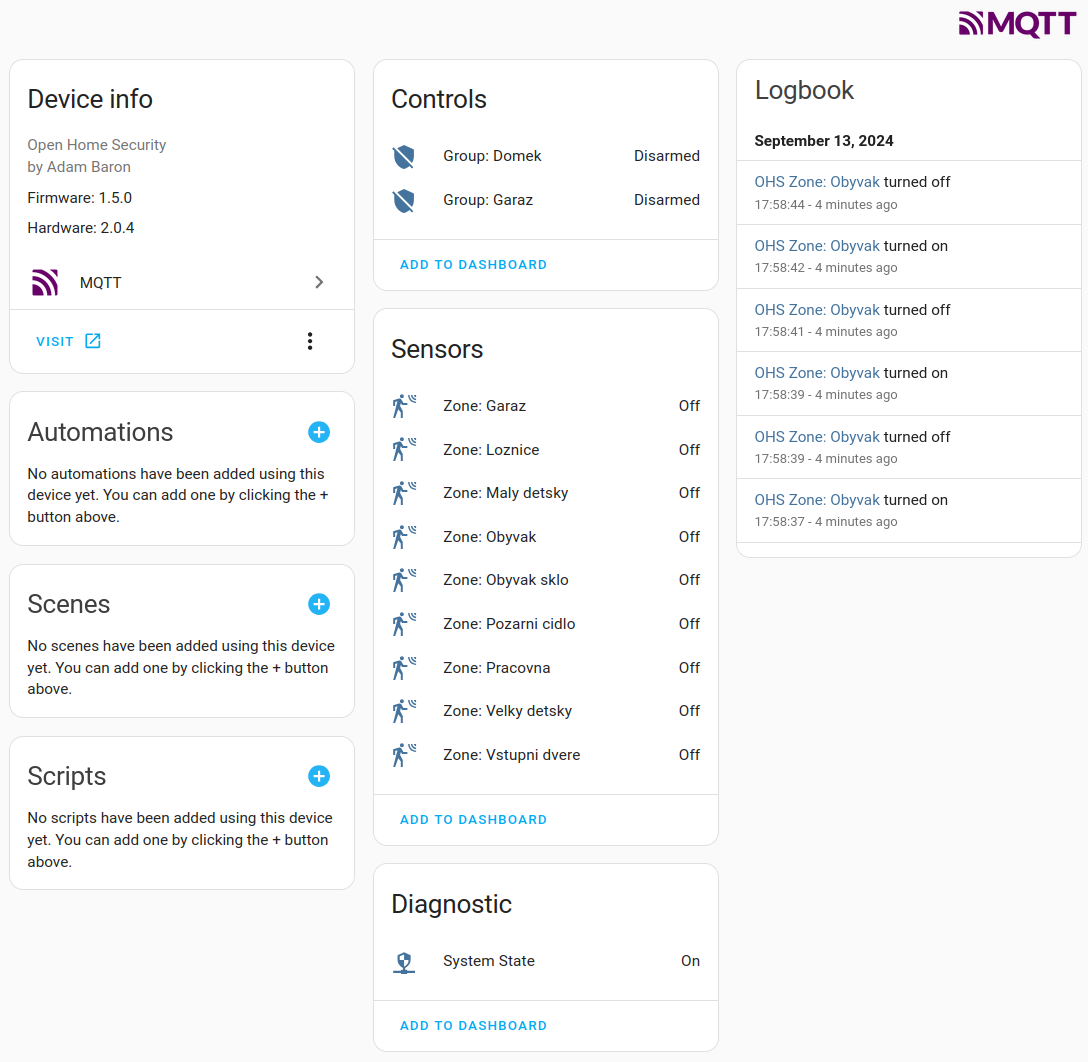
A new version of the gateway firmware (v1.5.0) is now available, offering enhanced MQTT support with the addition of Home Assistant Auto Discovery. As always, the updated firmware image is available on GitHub.

Now, let's take a closer look at what MQTT and Home Assistant Auto Discovery are.

MQTT (Message Queuing Telemetry Transport) is a lightweight messaging protocol ideal for devices that need to communicate in real-time, such as sensors and smart home devices. By implementing MQTT in your burglar alarm system, you enable real-time data transfer between the system and Home Assistant. 

Home Assistant Auto Discovery is a feature that allows Home Assistant to automatically detect and configure devices that support MQTT. This eliminates the need for manual configuration, as Home Assistant will automatically generate entities such as sensors, switches, and binary sensors based on the MQTT messages from your alarm system.

If you're new to MQTT, Home Assistant offers a convenient solution with the Mosquitto Broker add-on. You can easily install it directly from Home Assistant by navigating to Settings > Add-on Store and searching for "Mosquitto Broker." Once installed, head over to the Mosquitto Broker page in the Add-ons section, and click Start to launch the broker. For added security, it's recommended to create a dedicated user (e.g., "mosquitto") with its own password, under which the broker will operate.

Now let's go back to new gateway features. As always they are configurable over the web
interface. Main option to enable Home Assistant Auto Discovery is right on the Setting page as a toggle switch as shown on the picture. Enabling this will create the main MQTT topic for system state, allowing the Home Assistant to see it along with hardware and software version information and link to gateway web configuration page.

Additionally, similar switches are added to all groups and zones. When these switches are enabled, they are automatically propagated to Home Assistant as corresponding entities. This allows you to manage and control these groups and zones seamlessly within Home Assistant, enhancing integration and automation possibilities.

Following picture shows my gateway as new device inside Devices & services for MQTT.

This then can be then added to dashboard, and interacted with as any other Home Assistant device. 

Hope you like it :)

Saturday, November 13, 2021

Authentication added.

New firmware version 1.3.9 has been just released. It includes few minor improvements, and as main new feature an authentication, that was added to web interface.  How it works is pictured on right side. Every new client connection is asked for user and password that must match with internal values. Default user is: admin, and default password is: pass. Both then can be changed in Settings.

At first I was thinking to use obsolete HTTP basic authentication, to make it simple. But it is very obsolete, and also not supported by vanilla HTTPD from lwip contrib package. I was thinking how to add an authentication for a longer time. There are several methods to be used. First would be creating a single page application with authentication message encrypted in URL as parameters. Witch would require a bigger re-work on the HTML page generation. Now HTTPD has several pages, on which user can set tens of options for each section on a page. Quite a difficult task.  Second, to use a cookie to store some secret after user authenticate successfully on browser side, and request the browser to send this secret with each request. But lwip's HTTPD does not support cookies. 

Well I deiced for second option. I created a simple patch to HTTPD  to handle cookie generation and reception. First is done as part of dynamic header option for pages that are not statically liked, that is not generated via makefsdata program. Then, I added an additional callback, that is preceding request for every fs_open (file system open function). This allows an application to verify received cookie and then, if needed, rewrite the page( or file) requested to something else, for example login page.

I think it is nice and neat addition to lwip's HTTPD, so I will try to push it upstream, hoping it will get accepted.

New pre-compiled version is as always available GitHub, together with all sources. Enjoy!

P.S. Finally this is new version for my "production" home gateway. Resetting it after 163 days. Quite satisfied 💪

Sunday, June 20, 2021

Solving lwip troubles.

Some time after the introduction of lwip core locking into ChibiOS port, I started to notice that MQTT still tends to disconnect and connect right after. Same problem as before core locking. This is not very good that all other lwip process seems to work well, but MQTT is keep on reconnecting. Well lwip is a big and complex library to jump in and decode all possible problems, and I decided to start with MQTT client part only. There are quite a few debugging facilities in lwip and I turned on many to start seeing the whole picture.

Nice informative way to see information about lwip is to enable LWIP_STATS. There are many options what to see, like to examine possible memory problems by defining:
#define LWIP_STATS_DISPLAY 1
#define MEMP_STATS 1
#define PBUF_STATS 1
#define SYS_STATS 1

And adding:

#ifdef LWIP_STATS
  stats_display(); // Show lwip statistics
#endif

into while (true) lwip thread.

I started to torture again OHS application fir frequent radio packets resulting into MQTT publish messages. All was fine even with heavy usage of web interface and MQTT subscribe. But after 5 days the statistics started to show an error on MEMP TCP PCB and the in used number of same did not cease even after no other TCP communication then MQTT was used. I increased the number of MEMP_NUM_TCP_PCB to 50 and started again. 5 days later the same problem.

Examining MQTT library or searching forums did not help much. In logs I found that the client receives an empty pbuf which is forcing the client to disconnect. Mosquitto broker then does not see the keep alive periodic packet and also closes the connection. But I started to measure the exact time when the MQTT get out of pbufs, and it a bit surprised me that it happens exactly after 4.9 days. To be precise after 2^32 / 10000 = 429496,7296 seconds. There are timers in lwip that make various time dependent tasks, like removing used pbufs or dhcp. Deep diving into it I found out that the problem is not in lwip, but in ChibiOS port. The sys_now() function does not overflow on u32_t boundary but actually much earlier, causing the timers wait forever.

A patch of the sys_now() function seems to fix the problem completely. It comes with new OHS version 1.3.8 with a few cosmetics enhancements described in particular commits on GitHub. 

It is recommended to upgrade if you use MQTT.


Wednesday, April 7, 2021

Fixing MQTT

There was lately a lot of changes done in gateway MQTT processing. First of all I've introduced a lwip_assert_core_locked() function which present as helper macro throughout lwip network stack, but it is defined as empty. This macro is a quite useful feature, especially if lwip is running multiple sockets. ChibiOS has very functional and well defined bindings to lwip, however lacks the lwip_assert_core_locked() function definition. To benefit from this lock I've added following code to lwipopts.h:

#if LWIP_TCPIP_CORE_LOCKING
void lwip_assert_core_locked(void);
#define LWIP_ASSERT_CORE_LOCKED() lwip_assert_core_locked();
#endif

And the actual function to /arch/sys_arch.c:

#if LWIP_TCPIP_CORE_LOCKING
void lwip_assert_core_locked(void) {
  // If the mutex hasn't been initialized yet, then give it a pass.
  if (lock_tcpip_core == SYS_SEM_NULL) return;
  chSysLock();
  // Ensure that the mutex is currently taken (locked).
  if (chSemWaitTimeoutS(lock_tcpip_core, TIME_IMMEDIATE) == MSG_OK) {
    chSysHalt("TCPIP core is not locked!");
  }
  chSysUnlock();
}
#endif

Then basically you need to wrap every lwip API call with following macros:
LOCK_TCPIP_CORE();
lwip_function();
UNLOCK_TCPIP_CORE();

This helped a lot, since without the locking the gateway after some time was not sending ACK to MQTT broker, and was forced to reconnect every 5 or so minutes.

Second lwip source was updated to latest dev branch, which has some fixes for MQTT in it as well. 

Last, but not least, there are several changes introduced to MQTT thread. The connection/re-connection function was moved there as well from service thread.

All this is is pushed to GitHub as version 1.3.6.

Saturday, March 20, 2021

Release notification

Just a short post about OHS firmware. In case you would like to be notified about new version being  available for download, you can subscribe in GitHub directly by "Watch" button on top right. Either watch all, or "custom" and then just the releases.

More about releases, I've just pushed few commits to GitHub releasing 1.3.5. It's adding more support for remote zones, adding debug message to alarm thread, and fixing few small bugs.

Sunday, February 7, 2021

Zone expansion board

Over last few weeks I was playing with new addition to OHS, zone expansion board. The
board has 8 analog(balanced) and 1 digital(unbalanced) ports. Analog ports are hybrid, meaning that they can be switched in software to unbalanced. Connection can be established via wire(RS485) or radio(RFM69). It has onboard relay and similar power detection circuit as gateway. There are 2 free pins left that are taken out to allow some user application like additional relay board.

The relay present on expansion board can added as basic relay output, or it can be registered as remote Horn/Siren, by the configuration definition described in expansion board sketch. Also new functionality was added into gateway firmware, which is now able to recognize such remote Horn/Siren nodes and turn them on, when associated group is in alarm state.

Sketch is, as always, present in GitHub. And it is also available for sale.

Sunday, January 17, 2021

MQTT subscribe

A new 1.3.1 version of gateway firmware is committed to GitHub which is enabling MQTT subscribe functionality.

Gateway subscribes on topics: /OHS/set/#, particularly parses following 

/group /{#} - index of group {1 .. ALARM_GROUPS}
  /state - allowed commands {disarm, arm_home, arm_away}
/sensor - allowed only for Input nodes
 /{address} - node address like W:2:I:D:1
  /value - float value send to remote node
 

To describe it better for someone new to MQTT.  MQTT is an open OASIS and ISO standard,  lightweight, publish-subscribe network protocol that transports messages between devices. The protocol usually runs over TCP/IP. It is designed for connections with remote locations where a "small code footprint" is required or the network bandwidth is limited.

For example:

/OHS/set/group/#/state topics is able to perform disarm, arm_home, arm_away commands for group index specified as #.

/OHS/set/sensor/{address}/value topics is able to receive float number that is then passed to appropriate node address.

Above subscribe and already existing publish functionality allow direct integration with mobile applications,  logging platforms for sensor data, or Home Assistant:

Monday, December 21, 2020

Adding MQTT to gateway 2.x

MQTT was somehow last step of adding features present in gateways 1.x to gateway 2.x. Now with last version of 1.3 release, already available in GitHub releases, this come to live. For now only publish functions are implemented, but subscribe procedures and skeleton is already prepared. Beware that 1.3 release forces whole configuration to be erased! I suggest to take screenshots of each page before upgrading. I know it is not very convenient, and I will try to implement mechanisms that such future changes will be a bit elegant. That is without the need to reconfigure whole gateway again.

MQTT publish functions are now having their own thread, that is collecting queue of publish request. The thread then pushes one publish a time when system allows it.

The publish structure is a bit different, as it now more relies on given indexes and addresses rather then on names of elements. Main topis is OHS with subtopics:

 /state {On, Off} - Indicates if system is on
 /group
   /{#} - index of group
     /name
     /state {disarmed, arming, armed_home, armed_away, triggered, disarming}
 /zone
   /{#} - index of zone
     /name
     /state {OK, alarm, tamper}
 /sensor
   /{address} - node address like W:2:K:i:0
     /name
     /value

There are other small changes like Nodes tab is now showing value of authentication nodes, that is a name of person who last armed/disarmed this node. Same name is also passed to MQTT sensor value for same node type.

You can test now new 1.3 version with initial MQTT support, but there can be some rough edges.

Tuesday, September 29, 2020

Travis CI and precompiled firmware for OHS 2.x

Over last weekend I've created a Travis continuous integration for OHS 2.x gateway repository. This CI performs a test build on every commit that is pushed to it. What it does is that it verifies that the commit is buildable, and maybe more importantly, it creates new compiled firmware related to every new commit, and places it back in releases section directly in GitHub.

This means that the latest, and also historical firmware are now available for download in https://github.com/vysocan/OHS_2-gateway/releases 

Binary files .bin can be directly used for DFU - Device Firmware Upgrade.

Tuesday, August 25, 2020

DFU - Device Firmware Upgrade

Gateways 2.s have now a new user convenient way of upgrading firmware without any external programmer. As STM32F4xx devices include built in USB DfuSe bootloader, I was wanting to implement such functionality into OHS as well. Since software version 1.2 there is an option in shell interface to boot the device to dfu mode., and then upgrade the firmware directly via USB cable.

DFU tools:

dfu-util  is a simple multi-platform command line tool that can upload binary data directly to flash.

List DFU ready devices via: dfu-util -l

Example output of gateway 2.x, most important is the 'alt=0, name="@Internal Flash  ' descriptor that we gonna use:

Found DFU: [0483:df11] ver=2200, devnum=12, cfg=1, intf=0, path="3-6", alt=3, name="@Device Feature/0xFFFF0000/01*004 e", serial="336A34763437"
Found DFU: [0483:df11] ver=2200, devnum=12, cfg=1, intf=0, path="3-6", alt=2, name="@OTP Memory /0x1FFF7800/01*512 e,01*016 e", serial="336A34763437"
Found DFU: [0483:df11] ver=2200, devnum=12, cfg=1, intf=0, path="3-6", alt=1, name="@Option Bytes  /0x1FFFC000/01*016 e/0x1FFEC000/01*016 e", serial="336A34763437"
Found DFU: [0483:df11] ver=2200, devnum=12, cfg=1, intf=0, path="3-6", alt=0, name="@Internal Flash  /0x08000000/04*016Kg,01*064Kg,07*128Kg", serial="336A34763437"

Flash the firmware via: dfu-util -a 0 --dfuse-address 0x08000000 -D ch.bin

STM32CubeProgrammer is also multi-platform tool but with graphical user interface. One downside is that you need older Java version installed to run it, but once you have it it will work nicely.

DFU howto:

  1. Connect your laptop/PC via USB cable to gateway. Status LED on gateway should change to short rapid flashes.
  2. Open any terminal emulation program like Putty and open serial connection to new enumerated USB device. On Linux it will be ACM0.
  3. In the terminal issue command 'boot dfu'.
  4. The gateway should close the USB connection, terminal will exit, or close, and the status LED will stop blinking.
  5. New USB device should be enumerated as 'STMicroelectronics STM Device in DFU Mode'
  6. Use any of DFU tool to list, connect and to download(in terms of to download a file to a DfuSe device) firmware into gateway.
  7. Reset the gateway via onboard reset button.