Wednesday, February 18, 2015

Web interface - log

One of the important pages provided by the embedded web server is a log. It translates various system messages to meaningful text(at least for me :). The table is showing 20 entries at once and you can list through them by buttons << and >>. Button "now" will take you to the most recent message. As you can see on the left, there is numeric id of the message, time stamp, the message text and status of the SMS function. Above the table is a button to clear all the log table, but it takes a while.

Physically the log is located in 512kb I2C controlled EEPROM, and the logging mechanism using 16 bytes for every event. This makes together maximum number of 4096 log messages stored. Any call to log message  function pushes the message to FIFO along with actual time stamp. Then there is a logger thread that takes care about the EEPROM circular buffer, and also about the SMS. Every message can be send as SMS to appropriate group of people.

The message itself looks like this:

150218104158;SCW

As you can deduce the "15 02 18" is date, "10 41 45" is time, next is the status of SMS function:
  • "." requested, failed
  • "," not requested, failed
  • ";" not requested, acknowledged
  • "|" not connected
  • ":" sent
And last 3 characters is the message itself, well not actually, but it is its acronym or code. SCW is "System configuration saved, by pressing button on web interface". All these are decoded by web server and SMS function. You can look for more in code.

Logger thread also pushes all messages into following MQTT topics:

OHS/Log 150218104158;SCW

I'm planning to create on/off button for MQTT push.

Saturday, February 7, 2015

Web interface - sensors

Sensor configuration page has a lot similar with authentication units. Sensor can be connected by wire(RS485) or wireless(RFM12B). It is shown in the address field. "W" stands for wired and "R" for Radio. Units in range 1-14 are wired and 17-143 are connected wireless. Currently the firmware recognize following types:
  • Temperature
  • Humidity
  • Pressure
The type and address is coded in the registration message in the sensor firmware. Other values can be configured and are stored in unit in chip EEPROM. As you can see above you can turn the sensor On or Off. Also you can allow the sensor value to be propagated to MQTT. The default path is "OHS/Group_name/Sensor/Sensor_Type/Sensor_local_address". Example looks like this:

OHS/Zahrada/Sensor/Temperature/0  23.00
OHS/Zahrada/Sensor/Humidity/0  53.00
OHS/Zahrada/Sensor/Temperature/1  24.04
OHS/Zahrada/Sensor/Pressure/0 998.38
OHS/Dilna/Sensor/Temperature/0   9.48
OHS/Domek/Sensor/Temperature/0  13.02
OHS/Garaz/Sensor/Temperature/0  12.06

Last setting is the group name the sensor belongs to.

Sensors are dynamically added when they first join the network. The Sensor type can be chosen to any possible, as long as its value can be stored i a float variable. Main unit does not care about the sensors at all, it doesn't do any computation with it values, and also it does not verify the content. Main purpose is to act as a gateway for MQTT to NodeRed or similar tool. Only value that indicate the health of the sensor is time-stamp called last OK, that indicates delivery time of last message from sensor.

Sensors are defined in the code by following struct:


  uint8_t address;
  char    type;
  uint8_t number;
//          |- MQTT publish
//          ||- Free    
//          |||- Free
//          |||||||- Group number
//          |||||||- 0 .. 15
//          |||||||- 
//          |||||||- 
//          ||||||||-  Enabled   
//          00000000
  uint8_t setting;
  float   value;
  systime_t last_OK = 0;

In the future, the parameters for sensors, and also for authentication units, will extend as they will be battery monitored. I would like main board to take care of the sensors battery life in form of some flag and also sms.

Monday, January 26, 2015

RS485 protocol

Last post reminded me to write about library I have created for the wired network. It is called simply LibRS485, or NilRS485 adopted to work in NilRTOS. The library defines packet protocols on RS485 drivers. I use ST3485EB a 3.3 V powered, 15 kV ESD protected and up to 12 Mbps RS-485 half duplex transceiver. Inexpensive SO8 chip that has all that is needed already inside. As it is half duplex we need one extra pin to tell the transceiver if we are receiving or transmitting. The transmission itself require one twisted pair of wire and is able to push the data to distances over 1km with reasonable speed. The nice thing about RS485 it uses a differential balanced line and resists electromagnetic interference from motors and other equipment, more can be found on wiki.

LibRS485 uses a 9bit protocol and Multi-processor Communication mode defined in ATmega. This allows the MCU to do other thing without looking on communication unless there is a address frame. Basically i work like this:

  1. All nodes are in Multi-processor Communication mode (MPCM)
  2. One of the node sends an address frame, and all receive and read this frame.
  3. All nodes reads the address frame and determine if it has been selected. If so, it clears the MPCM, otherwise it waits for the next address frame and
    keeps the MPCM setting.
  4. The addressed node will receive all data frames until a new address frame is received.
  5. The other nodes which still have the MPCM bit set, will ignore the data frames.
  6. When the last data frame is received by the addressed node, the addressed MCU sets the MPCM and waits for a new address frame. The process then
    repeats from 2.
Library also defines a packet structure like this:
 -------------~~~~~~~~~~~~~~~~~~~~~~
 - A - P - X -  D0 - D63 ~ S0 ~ S1 ~
 -------------~~~~~~~~~~~~~~~~~~~~~~
  
  - Required fields
  ~ Data and signature fields
  A Address - 4 bits form and 4 bits to address.
    0  is master, but not really as any node can drive communication
    15 is broadcast to all
    14 addresses left for other devices
  
  P Packet definition - 2 bits type and 6 bits length.
    Flag bit configuration:
    FLAG_ACK 3
    FLAG_NAK 2
    FLAG_CMD 1
    FLAG_DTA 0
     
    Types: CMD - Command - user defined general commands value 0 - 63
           DTA - Data - user data length D0 - D63 and CRC S0, S1
           ACK, NAK - flags for data, using signature of data packet
           
  X XOR of A and P, for basic transfer safety.
  
  D0 - D63 user data.     
                       
  S0 ~ S0  CRC for user data or signature for ACK, NAK.   

So basically there are two types of packets. Command packet that has only 3 bytes (APX) and deliver a command(number 0-63) to node(s). It is used for example to issue a call for registration. Or data packet  that has 6-69 bytes (APX D0~D63 S0S1). This deliver any data to node(s). The nodes are addressed by its address 0-14, which select any individual node. Or address 15 that is broadcast to all nodes.

Friday, January 16, 2015

Web interface - authentication

Authentication units have their own configuration page as shown on the right. On the top, again, is a summary of authentication units connected to system. The units can be connected by wire(RS485) or wireless(RFM12B). It is shown in the address field. "W" stands for wired and "R" for Radio. Address range is the decision maker here. Units in range 1-14 are wired and 17-143 are connected wireless. Address and type of the authentication unit is defined in remote unit itself. The few options to set is turn the unit On or Off, other is to attach them to certain group.

Remote units are dynamically added to the system at any time by process called registration. This process is activated by service thread few seconds after the system starts, or when you power up any remote units it will issue call for registration. If the unit is present already the system will re-reregister it with new parameters. The actions taken are presented in the log. You can for example see following messages:


If you miss any unit that should be there you can push "Reregister" button and the system will issue registration call.

Going little more in detail, the all the settings are permanently stored in remote units in-chip EEPROM. By default the units register with their defaults, that is not enabled and belonging to group 16. And you have to set them on first. The other settings like functions they provide is dependent on the hardware and is coded in the registration message they sent to main board. Any remote unit can provide more then one function, as you can see on picture above. Unit 1 is iButton authentication unit and also provide ambient temperature.

Monday, January 12, 2015

Web interface - phone numbers

Web interface also include phone numbers setup. There is now space for 8 numbers. On the top you can see the overview in a table. Bellow there is selection button to chose to work with entries. Phone can be enabled or disabled, so you can temporary take anyone out. You can create unique name for every phone number for convenience. And it will appear by this name on other configuration pages. If you set "Global" option to yes the number will be informed about any event. As opposed to "Global No" the number will be informed only about group specified events. This page only specifies the setting for individual numbers, selecting which event will be passed is done in global configuration page.

Friday, January 9, 2015

Web interface - keys

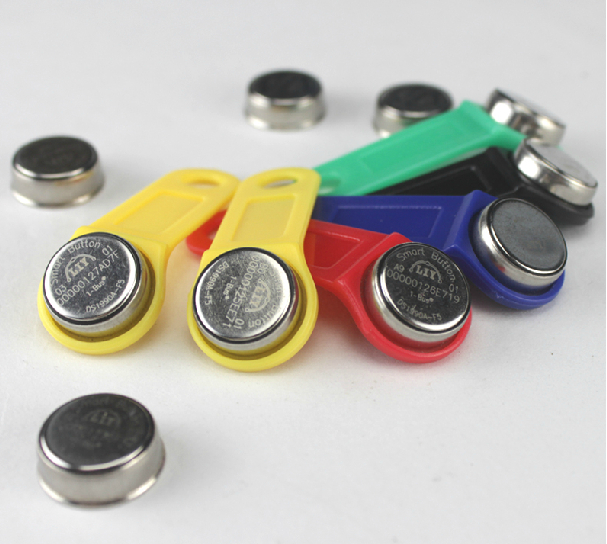
Another configuration page is about iButton keys. You can see the page on the right. Settings here are rather simple on the top you can see the table of assigned keys. There are name and and 8 byte address of iButton key. There is currently space to store up to 8 keys, but can be expanded. Bellow that is a pull down selection to work with single key.  There is not much to say about that except of last key value that is set to 55's. This value hold the last unauthorized key address. That can be used either to see address of key that is not yours. Or better when you have new key, you can just touch authorization unit. The system recognize unknown key, issue a warning message in the system log, and store the address value here. Next thing is to copy paste the value to some empty slot and give it a name, and press "Save all" to update the EEPROM. Well there is also laser printed address on every iButton, but in reverse order and it is bit tiny.

The system uses just ROM address of iButton, that mean you can use any iButton as a key even temperature probes and such. Now this bring another thought about security. First I consider iButton secure, but they can be read and copied, so can be RFID tags. Also touching probe with iButton is more convenient than to type 16 hex digit on keypad. But it can be surely improved. For example if you stay with iButton there is NVRAM version like DS1992. It gives you 1Kb of non volatile RAM you can use for floating code that can be generated every time you touch authorization unit. This makes coping much more complicated.

There is also possibility here to use other means of authorization, like NFC found on many phones. Or a simple keypad, but I have small children and prefer ROM iButton for its price and durability. Maxim states "Thanks to sealed stainless steel, you can drop it, step on it, or scratch it. The iButton is wear-tested for 10-year durability and a million hot contacts."

Tuesday, December 2, 2014

Web interface - groups

Few post ago I have touched the zone setting in web interface. Now this lead to groups. This setting combines multiple sources into one object. Such object consists of zones, authentication units and sensors and represent them to outside world. This allow you to set different alarm settings for your house and for your garage. For example you can have your garage armed and monitored while you are sleeping in your house, just by setting corresponding zones in garage into separate group. On this page you can also see what authentication units are allowed to arm and disarm particular zones, and also you can see sensors that are attached.

The group itself does not have too much settings. You can set the group name, set it On or Off and assign a output trigger for PIR and tamper event. All other parameter are taken form their respective sources like zones, sensors and such. But group setting offers great overview of what is going on in your system. You can see the group status, if it is armed or alarm is tripped and how long we are waiting for the authentication.

There are 16 groups not only to differentiate zones, but also to distinguish location of sensors and to allow proper MQTT propagation. More on this topics soon.